Policy Center
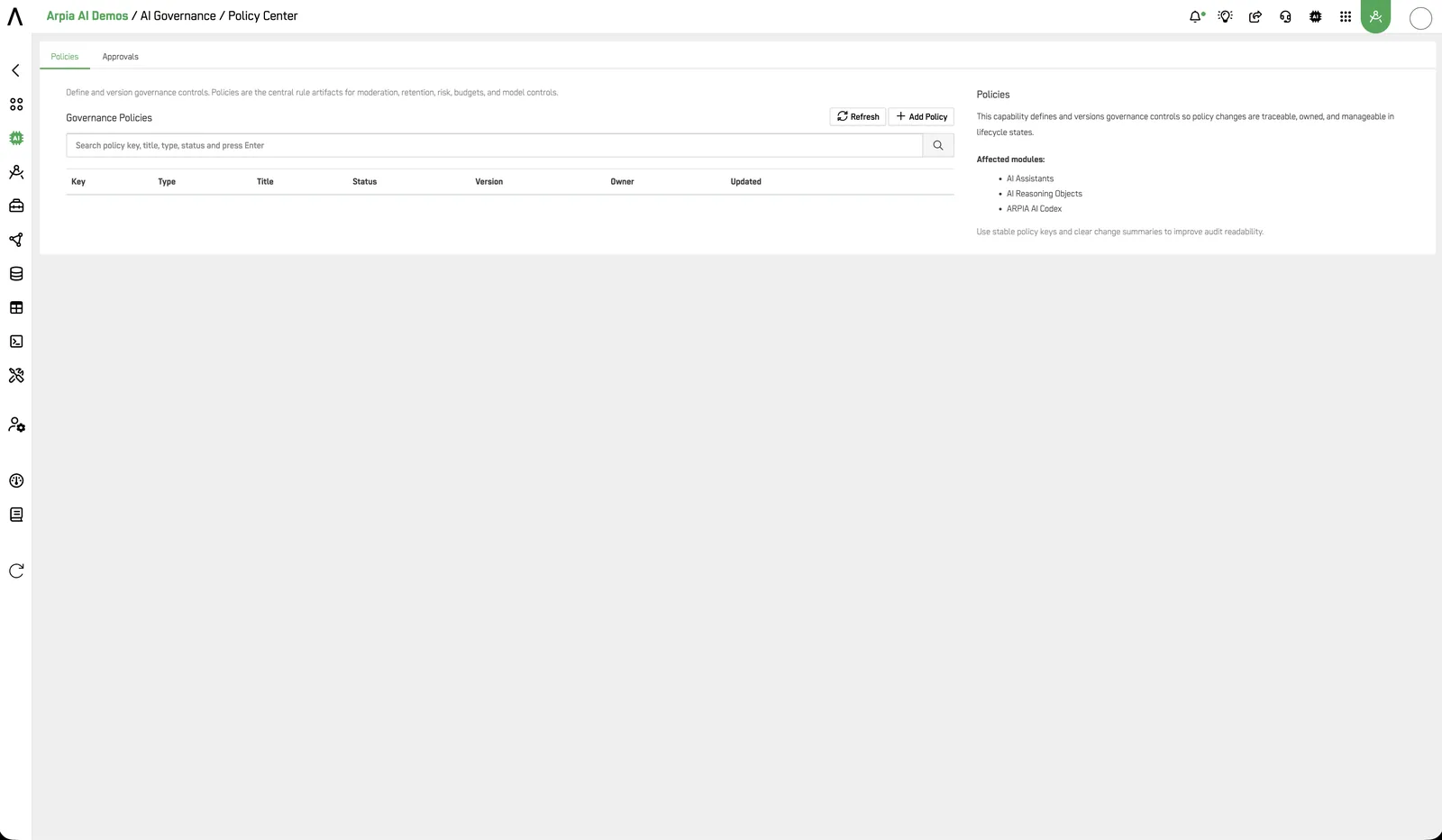
The Policy Center is the governance control layer for AI behavior across the ARPIA platform. It provides a versioned, auditable system for defining, reviewing, and enforcing policies that govern how AI Assistants, AI Reasoning Objects, and ARPIA AI Codex operate.
Define and version governance controls. Policies are the central rule artifacts for moderation, retention, risk, budgets, and model controls.
Policy Center is organized into two tabs: Policies and Approvals.
Who Uses This Section#
| Role | How They Use It |
|---|---|
| CISO / Security Officer | Define and enforce organization-wide AI behavior controls. Set blocking policies to prevent prohibited outputs. Review approval history for audit evidence. |
| Compliance Officer | Version and document policy changes with Change Summaries. Ensure all active policies have an accountable Owner. Track approval decisions for SOC 2 and ISO 42001 readiness. |
| Platform Administrator | Create and manage policies scoped to specific apps, assistants, workers, or globally. Move policies through the lifecycle from DRAFT to ACTIVE. |
| CTO / Technical Lead | Use Monitor mode to observe AI behavior before enforcing stricter controls. Escalate to WARN or BLOCK when patterns are confirmed. |
Policies#
The Policies tab is the central registry of all governance controls in the organization.
Affected modules: AI Assistants, AI Reasoning Objects, ARPIA AI Codex.
The Governance Policies table displays: Key, Type, Title, Status, Version, Owner, Updated. Use the search bar to filter by policy key, title, type, or status.
Policy Lifecycle#
Policies follow a recommended progression:
DRAFT → IN_REVIEW → APPROVED → ACTIVE
Use stable policy keys and clear Change Summaries at each version to maintain audit readability.
Creating a Governance Policy#
Click + Add Policy to open the policy form. Fields adapt based on the selected Policy Type.
Policy Type
Select the governance control category. Fields below adapt to the selected type.
| Type | Purpose |
|---|---|
| MODERATION_RULESET | Content moderation rules applied to AI outputs — defines what the AI is prohibited from generating |
| MODEL_ALLOWLIST | Restricts which AI models are permitted to execute within a given scope |
| BUDGET | Sets token or cost spending limits for AI activity within a scope |
| RISK_CONTROL | Defines risk thresholds and escalation rules for AI-generated outputs |
| DATA_RETENTION | Controls how long AI interaction logs and outputs are retained before purge |
Policy Key
A stable unique identifier used for traceability across versions and audits.
Use a consistent naming convention such as
moderation:global-defaultorbudget:codex-monthly.
Title
Human-readable name shown in governance listings.
Description
Explain the intent, expected behavior, and when this policy should be used.
Owner User
The accountable owner responsible for the maintenance and review lifecycle of this policy. Select from the list of platform users.
Status
The current lifecycle state of the policy.
| Status | Description |
|---|---|
| DRAFT | Policy is being authored — not yet enforced |
| IN_REVIEW | Policy is under review — pending approval |
| APPROVED | Policy has been approved — ready to activate |
| ACTIVE | Policy is live and being enforced |
Recommended progression: DRAFT → IN_REVIEW → APPROVED → ACTIVE.
Policy Configuration#
The fields below appear for MODERATION_RULESET type policies.
Rules (one per line)
Individual rule statements that define what this policy enforces. Enter one rule per line. Keep each rule explicit and testable.
Severity Threshold
Minimum score (0.00–1.00) required to trigger a policy action. Default: 0.50.
Enforce Mode
Defines how the platform responds when the policy is triggered.
| Mode | Behavior |
|---|---|
| MONITOR | Logs only — no user-visible action. Use for observation before enforcement. |
| WARN | Flags the response — the output is returned but marked. |
| BLOCK | Prevents the output — the response is blocked before reaching the user. |
Scope Type / Ref
Controls where this policy is applied.
| Scope Type | Applied To |
|---|---|
| GLOBAL | All AI activity across the entire organization |
| APP | A specific AI App |
| ASSISTANT | A specific AI Assistant |
| WORKER | A specific AI Worker |
| CODEX | ARPIA AI Codex jobs |
When a specific scope type is selected (APP, ASSISTANT, WORKER, CODEX), a Ref field appears to identify the specific target.
Payload Preview (JSON)
An auto-generated read-only preview of the policy configuration as it will be stored and evaluated. Updates in real time as fields are filled in. Example:
{
  "rules": [],
  "severity_threshold": 0.5,
  "enforce_mode": "MONITOR",
  "scope": {
    "type": "GLOBAL",
    "ref": "GLOBAL"
  }
}
Change Summary
Document what changed, why, and the expected operational impact. Required at each version update to maintain a clear audit trail.
Click Save to create the policy. Click Close to discard.
Approvals#
The Approvals tab enforces change control by requiring explicit governance decisions before sensitive policy changes are considered valid.
Review and decide pending policy changes. Use approvals to enforce change control and accountability.
Affected modules: AI Assistants, AI Reasoning Objects, ARPIA AI Codex.
Apply approvals on policies that can block responses or materially change behavior.
The Policy Approvals table displays: Policy, Version, Approver, Decision, Decided At. Use the search bar to filter by policy, approver, or decision.
Use Refresh to reload the approvals queue with the latest pending items.
Governance Best Practices#
Use stable policy keys. A key like moderation:global-default remains constant across versions, making it easy to trace policy history in audits without ambiguity.
Start in MONITOR mode. Before enforcing WARN or BLOCK, run the policy in MONITOR mode to observe how often it triggers and validate the rules are correctly scoped.
Always fill the Change Summary. Every version update should document what changed and why. This is the primary audit artifact for demonstrating policy governance across compliance frameworks:
| Framework | Relevant Controls |
|---|---|
| SOC 2 Type II | CC6.1 (logical access), CC7.2 (system monitoring), CC8.1 (change management) |
| ISO 42001 | Clause 6.1 (risk treatment), Clause 8.4 (AI system controls) |
| NIST AI RMF | GOVERN 1.2 (accountability), MANAGE 2.2 (response and recovery) |
| EU AI Act | Article 9 (risk management system), Article 12 (record-keeping) |
| ISO 27001 | A.12.1.2 (change management), A.18.1 (compliance with legal requirements) |
Assign an Owner to every policy. Ownerless policies create accountability gaps. Every ACTIVE policy should have a named owner responsible for its review cycle. This satisfies accountability requirements across SOC 2, ISO 42001, NIST AI RMF, and EU AI Act Article 9.
Related#
- AI Governance — AI Governance section overview
- Operations — AI Assistants inventory, Moderation, and Model Groups
- Overview — aggregate metrics and provider health dashboard