How-To Guide for "Create Multiple Options"
Overview#
The "Create Multiple Options" field lets users add their own custom choices when predefined options aren't enough. Users add as many entries as they need, in real time.
Key Features#
- User-generated entries: Users add as many options as they need.
- Dynamic input: Each option is added one at a time.
- Real-time updates: New options appear instantly as they're added.
Steps to Configure the Field#
Step 1: Select the field type#
- Open your Data Form configuration.
- Add a new field or edit an existing one.
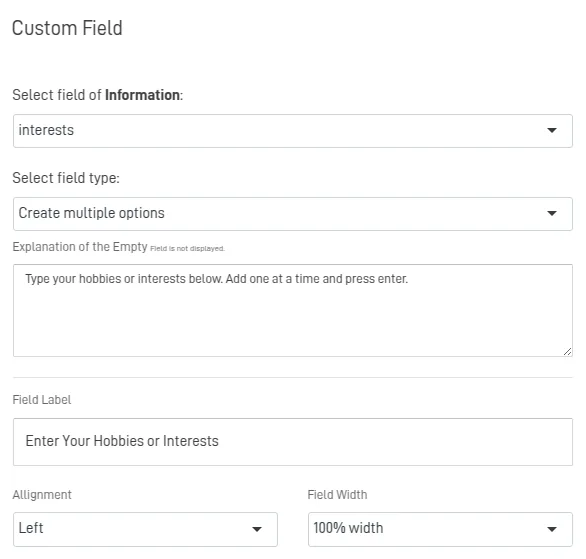
- In the Field Type dropdown, select Create Multiple Options.
Step 2: Configure field details#
- Field Name: A unique name (e.g.
interests). - Field Label: The label shown in the form (e.g. "Enter your hobbies or interests").
- Explanation of the Empty Field (optional): Guidance for users. Example: "Type a hobby or interest and press Enter. Add one at a time."
- Alignment: Left (default), center, or right.
- Field Width: e.g. 100% for a full-row layout.
Step 3: Configure advanced options#
- Required Field: Check this if users must add at least one option.
- Blank on Load: Keeps the field empty until the user adds a value.
Step 4: Save and test#
- Click SAVE or EDIT FIELD.
- Test the form: * Confirm users can add as many options as they want. * Confirm entries are saved as JSON in the destination table.
Example Configuration#
Scenario: A user enters their hobbies or interests.#
- Field Name:
interests - Field Label: "Enter your hobbies or interests"
- Field Type: Create Multiple Options
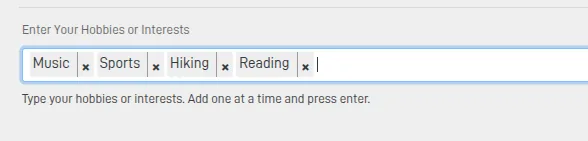
- Options added by the user:
Example JSON output:#
["Music","Sports","Hiking","Reading"]
Best Practices#
- Encourage meaningful entries: Guide users toward relevant, concise values to keep data quality high.
- Give context: A clear label and description tell users what's expected.
- Prompt a review: Ask users to check their entries before submitting to avoid accidental ones.
Summary#
The "Create Multiple Options" field lets users add custom entries with no predefined limits. It's ideal when standard options aren't enough, and it saves diverse input as JSON — supporting a more personalized experience.